Run Codex, Claude, & Gemini From GitHub Issues with Netlify Agent Runners
What if a GitHub comment could send work to Claude Code, OpenAI Codex, or Google Gemini and come back with a PR you can review?
You can do that today with a Netlify account, Netlify Agent Runners, and netlify-labs/agent-runner-action.
Add @netlify to an issue or PR comment, and GitHub becomes the place where you start the agent run:
@netlify Do a security review of the auth flow and open a PR with fixes.That's it. Your repo now has a remote agent you can ask for implementation passes, audits, reviews & so much more.
Setup
If you already have a GitHub-connected Netlify site, the setup is pretty small:
- Install the Netlify coding GitHub App.
- Add
NETLIFY_AUTH_TOKENandNETLIFY_SITE_IDas repository secrets. - Add the workflow from
netlify-labs/agent-runner-action. - Open an issue or PR comment with
@netlify codex,@netlify claude, or@netlify gemini. - Review the result like any other contributor's PR.
Usage
Once you are setup, this is especially useful for stuff like:
- Small fixes you keep putting off.
- Test coverage around known flows.
- PR review from another model.
- Security and dependency audits.
- Internal tools and admin UI work.
- Documentation updates.
- Performance sweeps.
- Follow-up tasks after a larger implementation.
Just Tag @netlify or @netlify {modelName} specific models for specific tasks.
For Codex, its the default:
@netlify codex Do a security review of the auth flow and open a PR with fixes.For Claude Code:
@netlify claude Build the admin dashboard described in this issue.For Google Gemini:
@netlify gemini Find the performance bottlenecks in this page and suggest fixes.Trigger AI agents where teams already describe work: issues and pull requests.
No local checkout. No "who has the right API key?" dance. No context switching into a separate coding tool just to ask for a first pass, a review, or a focused implementation.
GitHub Action
Install the Netlify coding GitHub App, connect a Netlify site to the repo, add the required repository secrets, then add the workflow from the action README.
The netlify-coding app will allow Agent runners to open PRs on your Github Repo.
Once that's connected, you can install the action workflow
https://github.com/netlify-labs/agent-runner-action
- uses: netlify-labs/agent-runner-action@main
  with:
    netlify-auth-token: ${{ secrets.NETLIFY_AUTH_TOKEN }}
    netlify-site-id: ${{ secrets.NETLIFY_SITE_ID }}
And the secrets the action needs:
NETLIFY_AUTH_TOKEN
NETLIFY_SITE_ID
Once the workflow exists, and its pushed to your main branch, you trigger an agent run by mentioning @netlify in an issue or PR comment:
@netlify codex Add end-to-end tests for the checkout flow.In practice, that looks like a normal GitHub issue comment:
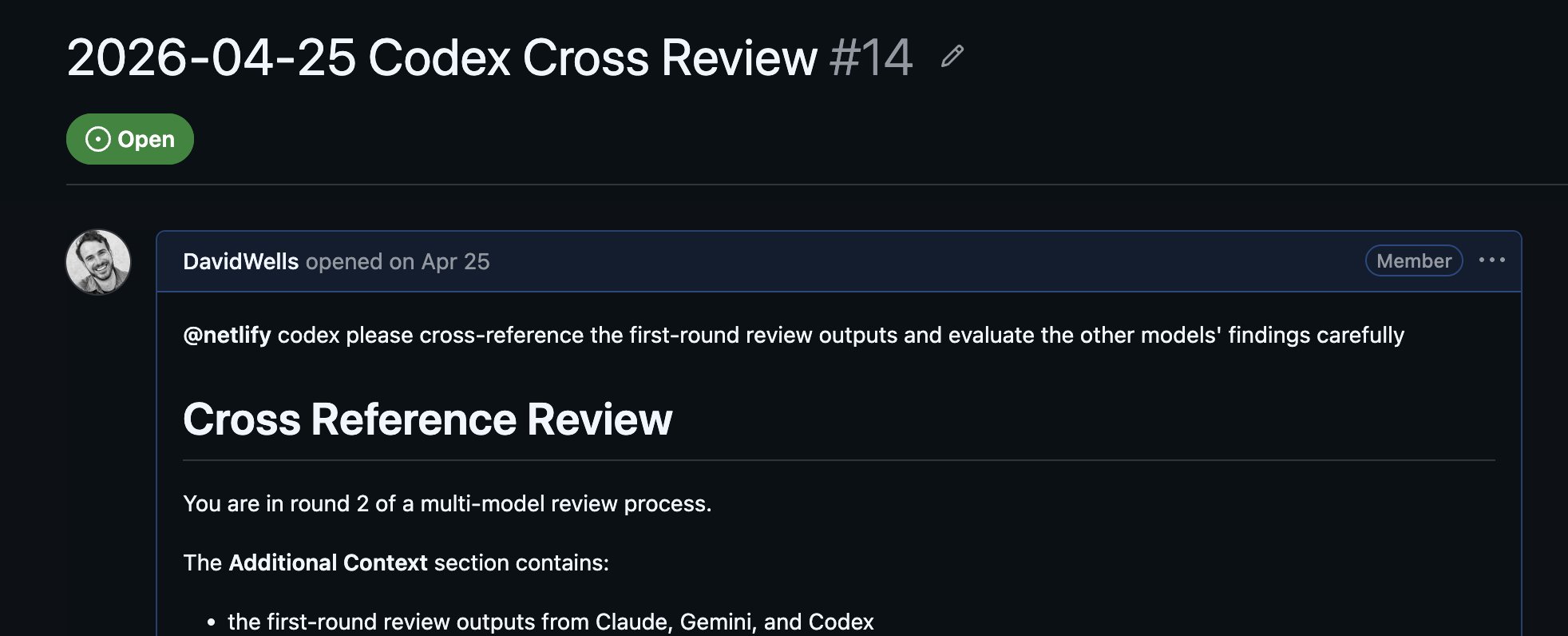
And the result comes back into the same GitHub thread:
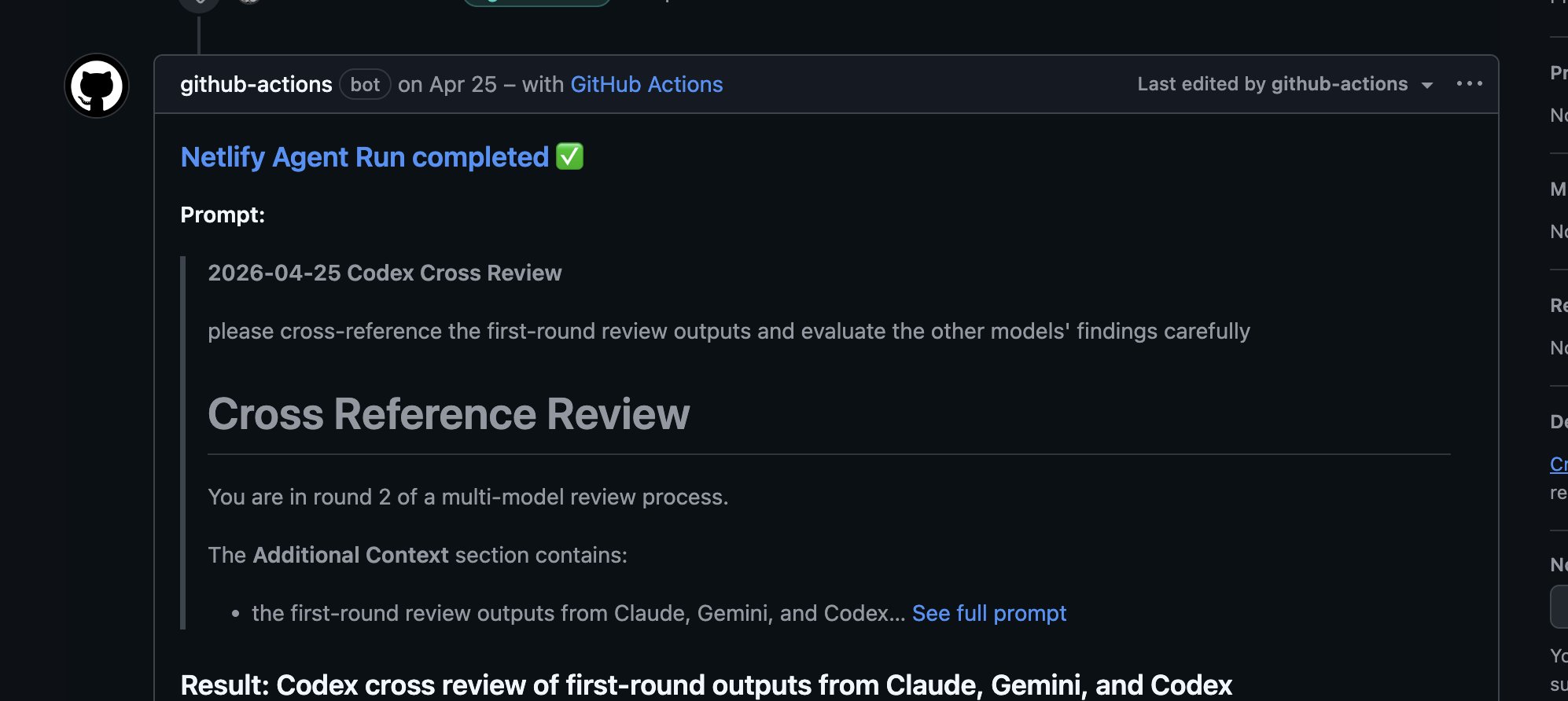
The action picks up the mention, starts a Netlify Agent Runner, posts status back to GitHub, and can create a PR with the changes. The action supports codex, claude, and gemini, with Codex as the default agent at the time I am writing this.
The official README has the full workflow file, including the event triggers, permissions, concurrency controls, and preflight checks:
https://github.com/netlify-labs/agent-runner-action
The case for remote agents
Most agent workflows still start as a local ritual.
Open a terminal. Start a coding agent. Paste context. Point it at the right files. Wait. Copy results back into a PR. Ask another model to review it. Repeat.
That works, but it keeps the agent loop tied to one person's machine.
Moving the trigger into GitHub changes the workflow:
- The request is durable.
- The discussion stays attached to the issue or PR.
- The result can become a branch, deploy preview, and pull request.
- Follow-up prompts can happen in the same thread.
- Different models can take turns on the same problem.
This starts to feel like a lightweight version of multi-model "fusion" today. One model can implement, another can review, and a third can look for blind spots. You do not need a grand orchestration layer to get value from model diversity.
You can do the dumb, practical thing now:
- Ask Codex to implement the change.
- Ask Claude to review the UX, structure, or copy.
- Ask Gemini to do a broad second-pass review.
- Keep the whole paper trail in GitHub.
Prompting tips for better results
The prompts that work best look a lot like good issues. Specific target, useful context, clear acceptance criteria.
Bad:
@netlify make this betterBetter:
@netlify codex Add Playwright coverage for signup, login, password reset, and account deletion.
Keep the tests focused on the current UI. If any flow is not testable, explain why in the PR.
Good agent tasks have a clear target, an expected artifact, and an exit condition.
Here are useful starting points:
@netlify codex Do a deep security audit of auth, billing, and webhook code.
Open a PR only for concrete fixes. Leave lower-confidence observations as comments.
@netlify claude Build an internal dashboard for the HR team using the existing admin layout.
Include filters, empty states, and loading states.@netlify gemini Review this PR with fresh eyes.
Look for regressions, missing tests, unnecessary complexity, and places where the implementation does not match the issue.@netlify codex Scan the homepage for performance bottlenecks.
Fix low-risk issues directly and explain any larger architectural changes before implementing them.Do not treat the agent like a mind reader. Treat it like a very fast contributor who still needs a good ticket.
Use different models for different jobs
Having Codex, Claude, and Gemini available from the same GitHub interface means you can make them collaborate without building your own orchestration system.
For example:
- Open an issue with the task.
- Ask Codex to implement the first pass.
- On the PR, ask Claude to review for product polish and code clarity.
- Ask Gemini to look for edge cases, missing tests, and performance concerns.
- Ask Codex to address the concrete review findings.
You can also split work by temperament:
| Agent role | Useful prompt shape |
|---|---|
| Implementer | "Build this feature and open a PR." |
| Reviewer | "Find bugs, regressions, missing tests, and confusing code." |
| Auditor | "Look for security, auth, billing, data, or deployment risks." |
| Explainer | "Summarize what changed and what still needs human review." |
| Refiner | "Tighten this implementation without changing behavior." |
No model is always better. Disagreement is useful. A second model often catches the thing the first one optimized past.
Security notes
Issue-triggered agents are powerful and Netlify Agent Runners will run against isolated branches.
Even so, you want to be thoughtful of who is able to trigger the remote agents and watch out for prompt injection etc.
Start with the official workflow and keep these rules in place:
- Only trusted collaborators should be able to trigger runs.
- Keep
NETLIFY_AUTH_TOKENandNETLIFY_SITE_IDin GitHub Actions secrets. - Use the preflight mode when validating setup.
- Keep concurrency controls so one issue or PR does not spawn overlapping runs.
- Review the generated PR before merging.
- Do not add workflow steps that execute untrusted PR code under
pull_request_target.
That last one is important. pull_request_target can access repository secrets. The action README explains its trust model and why the example avoids executing PR-supplied code. If you fork the workflow and add npm install, pnpm test, or a build step against untrusted PR code, you can turn a useful automation into a credential leak.
Agents should accelerate review and implementation. They should not bypass code review.
Trigger work from anywhere
The most useful part is not that an agent can run from GitHub while you are already at your desk.
It is that GitHub is already on your phone.
You can be away from your computer, notice something that needs fixing, open an issue, tag @netlify codex, @netlify claude, or @netlify gemini, and have the first pass running before you get back.
The issue tracker becomes the remote control. The agent becomes the contributor. The PR becomes the artifact waiting for review.
Enjoy.